

SMM Panel API and Resellers: Sell Through API v2
Resellers can become the steadiest part of an SMM panel's revenue. They order through your API, often in volume, and send their own customers to you without you marketing to them.
In this chapter
- What the standard SMM API v2 is and why every reseller already knows how to use it.
- The actions your customer API offers and what a reseller does with each one.
- How to present your API docs page, manage keys and explain rate limits.
- How to price for resellers without destroying your margin.
- When to offer a child panel instead of plain API access.
- How the same API connects you to your own providers, and what to watch on that side.
Two sides of the same API
An SMM panel sits in the middle of a chain. Upstream, your panel is a customer of your providers: it places orders on their API. Downstream, your panel can itself be a provider: resellers place orders on your API. Both sides speak the same language, the standard SMM API v2, which is why panels can be stacked so easily.
| Your providers' API | Your customer API | |
|---|---|---|
| Who calls it | Your panel | Your resellers' panels, scripts and bots |
| Who pays | You pay the provider | The reseller pays you from their balance |
| Who sets prices | The provider | You |
| What you manage | Provider keys, balance, service mapping | Customer keys, reseller prices, rate limits |
Understanding this helps you think like your resellers: whatever frustrates you about a bad provider (vague errors, silent outages, sudden price changes) will frustrate them about you.
The customer API v2 explained
Every SMMFor panel exposes the standard API v2 at POST https://yourpanel.com/api/v2. Requests carry the customer's API key and an action. Because this format is a de facto standard across SMM panels, a reseller can add your panel as a provider in their own panel script or bot without writing custom code.
The actions
| Action | What it does | Why a reseller uses it |
|---|---|---|
services | Lists your services with rate, min, max, refill and cancel flags | To import your catalog and set their own prices |
add | Places an order (including drip-feed with runs and interval) | Every sale they make becomes an order here |
status | Returns status, charge, start count and remains for one order or up to 100 | To keep their customers' orders in sync |
balance | Returns their balance with you | To top up before they run out |
refill / refill_status | Requests a refill and checks its result | To pass their customers' refill requests to you |
cancel | Requests a cancel for up to 100 orders | To pass cancel requests through |
A few details matter for resellers and are worth knowing when they ask:
- The
rateinservicesis that customer's own price, discounts included, per 1,000. - Provider names are stripped from service names and categories, so your sources stay private.
- Amounts in the API are always in USD, even if your storefront displays other currencies.
- Statuses are the standard
Pending,In progress,Completed,Partial,Canceled, and thechargeis net of refunds, so a reseller's script handles partials correctly. - Instead of polling
status, resellers can register signed webhooks that fire when an order's status changes.
Full parameters, service types and error messages are in the API reference. A product overview is on the API feature page.
Your API docs page
Your panel's API documentation page is what a reseller reads before deciding to connect. Treat it as a sales page for technical buyers. Make sure that:
- The endpoint URL uses your final domain. If you move from a subdomain to your own domain later, tell existing resellers in advance.
- Example requests are easy to copy.
- Your service list is clean: clear names, honest min and max, correct refill and cancel flags. Resellers import these flags straight into their own panels.
- A short note explains your support channel for API issues and your support hours.
Link the API page from your storefront menu and footer. Many resellers look for "API" before they look at prices.
API keys
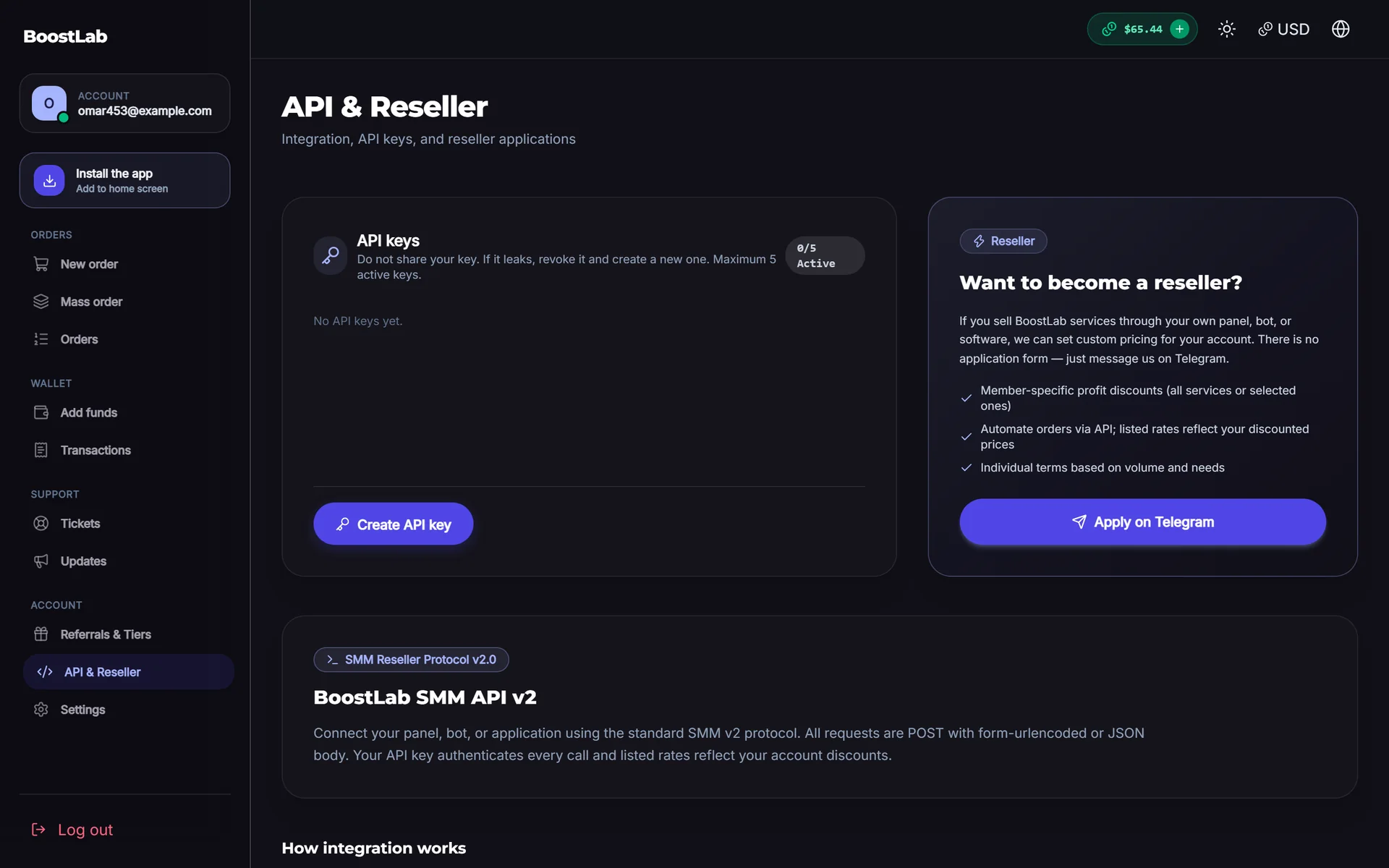
Each customer creates their own keys from their dashboard (on SMMFor, under API & Reseller, up to 5 active keys per customer). Encourage resellers to:
- Use one key per integration, for example one for their panel and one for a Telegram bot, so a leaked key can be revoked without breaking everything.
- Rotate keys when a developer leaves or a server is compromised.
- Never share keys in screenshots or support chats. If they paste one into a ticket, tell them to rotate it.
On your side, a key is effectively access to the customer's balance. Treat requests to "reset my key" with the same care as a password reset, and make sure the account owner is the one asking.
Rate limits
Rate limits protect your panel and your providers from runaway scripts. On SMMFor the customer API allows, per 60-second window, 120 requests per IP and 180 per key. Above that, the API returns HTTP 429 with a Retry-After header.
Most resellers never hit this. Those who do are usually polling the status of every order one at a time. When you see that, help them instead of blocking them:
- Suggest mass status (
orders=1,2,3, up to 100 per call) instead of single calls. - Suggest webhooks, so they are told when a status changes and do not need to poll at all.
- Remind them that
servicesis cached for a minute, so calling it every few seconds gives nothing new.
Reseller pricing
Resellers buy from you to resell at a profit, so your price must leave room for theirs. At the same time, they bring volume and cost you little in marketing. The question is how much of your margin to share.
Ways to price for resellers
| Approach | How it works | Good for |
|---|---|---|
| Same price for everyone | API users pay the storefront price | Very small panels, simple start |
| Personal prices | Specific customers get custom rates on chosen services | Your few large, proven resellers |
| Discount by volume | Lower prices once a customer passes a spending level | Rewarding growth predictably |
| Deposit bonuses | Extra balance on larger top-ups | Encouraging bigger deposits instead of lower rates |
SMMFor supports per-customer prices, and the services action returns each customer's own rate, so a reseller sees their discount immediately in their own panel.
A worked example
All numbers are examples. Say a service costs you $0.60 per 1,000 from your provider and your storefront price is $1.20.
| Buyer | Price per 1,000 | Your margin per 1,000 |
|---|---|---|
| Retail customer | $1.20 | $0.60 |
| Standard reseller | $1.00 | $0.40 |
| Large reseller (personal price) | $0.85 | $0.25 |
A large reseller earns you less per order but may order far more, with almost no support or marketing cost per order. Do not go below a margin that covers payment fees, refunds and the occasional provider failure you absorb. For the underlying maths, see SMM panel pricing and margins and the profit calculator.
Give personal prices to resellers with a track record, not to anyone who asks on day one. A reseller's first month tells you more than their promises about future volume.
Communicating price changes
Resellers sync your prices into their panels, and a sudden increase can wipe out their margin on orders they have already sold. When your provider raises prices, announce the change on your updates page and give resellers notice where you can. Being predictable is a feature they will pay for.
Child panels for resellers
Not every reseller has a panel of their own. Some want one but do not want to deal with scripts, hosting or providers. A child panel solves that: it is a complete SMM panel your customer rents from your site, with your panel as its only provider.
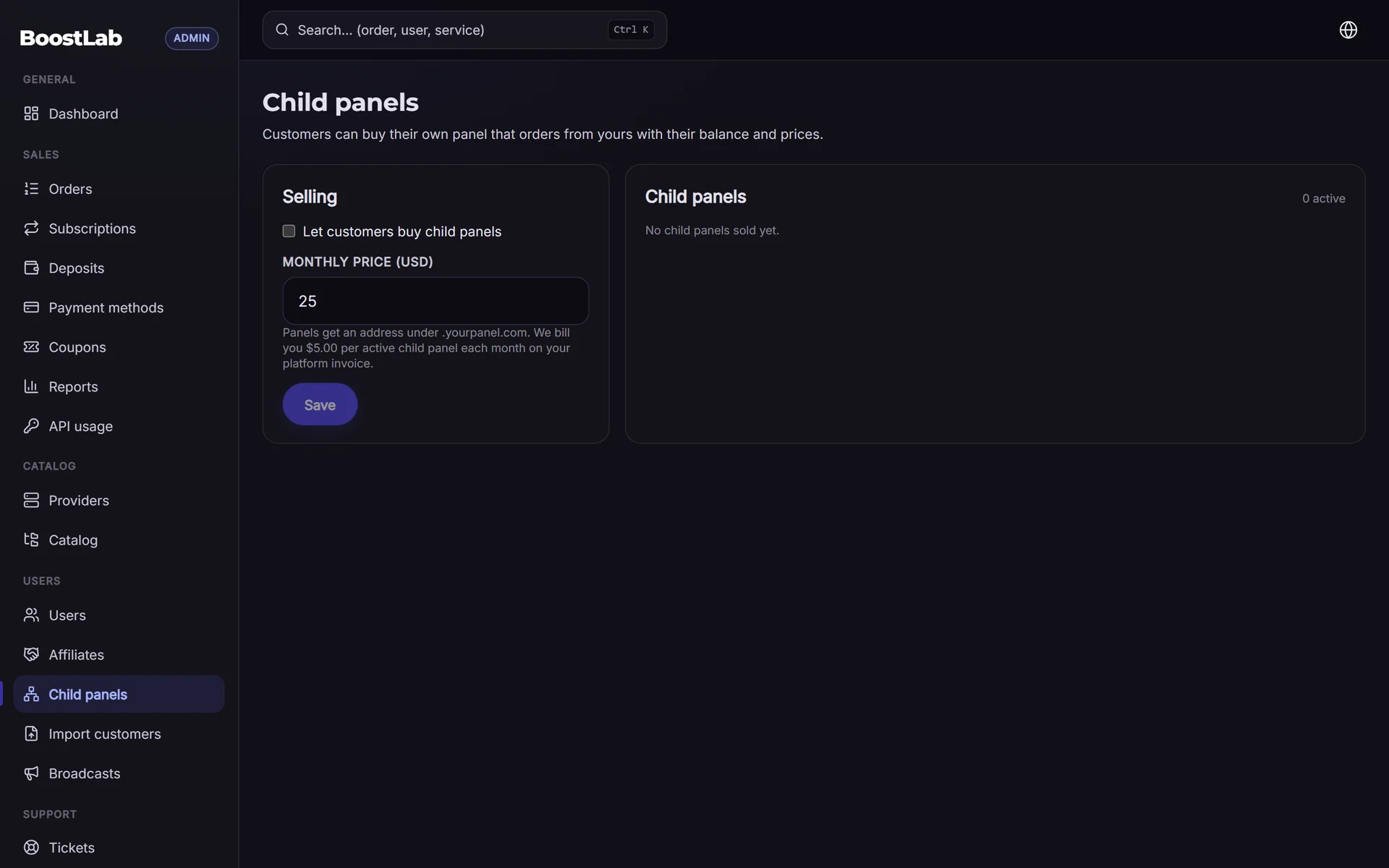
How it works on SMMFor:
- You turn on child panel sales and set the monthly price your customers pay.
- The customer buys it from your panel; the fee is taken from their balance with you and renews monthly.
- The child panel is pre-connected to your API with that customer's own key, so their orders use their balance and their personal prices.
- If the balance cannot cover the monthly fee, the child panel is paused, and closed if it stays unpaid.
- The platform charges the parent panel a small monthly fee per active child panel, shown on the pricing page.
| Plain API access | Child panel | |
|---|---|---|
| Reseller needs their own panel | Yes | No, they get one from you |
| Can use other providers | Yes | No, only your panel |
| You earn | Margin on orders | Margin on orders plus a monthly fee |
| Best for | Experienced resellers with their own setup | Beginners who want their own brand quickly |
More on the model: child panels and 1-dollar child panel vs SMM panel.
Working with your own providers' APIs
The other side of the API is the providers you buy from. On SMMFor you add any provider that offers the standard API v2 with its URL and your API key; provider keys are stored encrypted, and services, prices and statuses sync automatically.
What to watch on the provider side:
- Keep keys private and separate. Use a dedicated key for your panel at each provider, and rotate it if you suspect a leak.
- Map services, do not mirror everything. Import only services you have tested and want to sell; a huge mirrored catalog is hard to support.
- Watch for upstream changes. Providers change rates, min and max, and remove services. A weekly price check, described in the order management chapter, keeps your margin from slipping.
- Match refill and cancel flags. What you promise your resellers must match what your provider actually supports, because resellers' scripts rely on those flags.
- Keep provider balance ahead of reseller demand. A large reseller can multiply your daily spend overnight. When a reseller grows, raise your provider balance targets too.
Choosing providers in the first place is covered in how to choose an SMM provider.
Admin API for your own automation
Separate from the customer API, SMMFor offers an Admin API for managing your own panel from code: for example processing manual services, handling payments, users and tickets. It is useful once you have repetitive tasks worth scripting. It is switched off on child panels. Details are in the docs.
Common mistakes
- Offering resellers a deep discount on day one, before you know your real costs.
- Changing prices without notice and breaking resellers' margins.
- Leaving wrong refill or cancel flags on services, which resellers' scripts then trust.
- Blocking a reseller for hitting rate limits instead of showing them mass status or webhooks.
- Letting a reseller's growth drain your provider balance at night.
- Burying the API page where resellers cannot find it.
If you want a panel where the customer API, webhooks and child panels are ready from the start, compare plans on the pricing page.
Next step
Resellers find you the same way other customers do: through search. Continue with SMM panel SEO to make your panel discoverable. When you are ready to sell through your own API, open your panel on SMMFor with a 3-day free trial.