

SMM Panel Services: Build a Catalog Customers Trust
Your service list is the product. This chapter shows how to structure, name, price, test and maintain an SMM panel catalog that customers understand and keep ordering from.
In this chapter
- How to organise categories so customers find a service in seconds
- A naming formula and a description template that reduce support tickets
- How to set minimum and maximum quantities without losing orders
- The main service types (default, custom comments, subscriptions, drip-feed) and when to offer them
- Markup rules per category, with worked example numbers
- How to handle provider changes, hide or disable services and test before you publish
- A monthly routine for keeping the catalog clean
If you have not picked your providers yet, read how to choose an SMM provider on the SMMFor blog first. This chapter assumes you already have one or two providers connected and want to turn their raw lists into a catalog you can sell.
Why the catalog matters more than the design
When people start an SMM panel, they usually spend days on the logo and minutes on the service list. Customers do the opposite. A returning reseller opens the New Order page, picks a category, scans the service names and orders. If the names are confusing, the descriptions are empty or the prices jump around from week to week, they leave for a panel where ordering feels predictable.
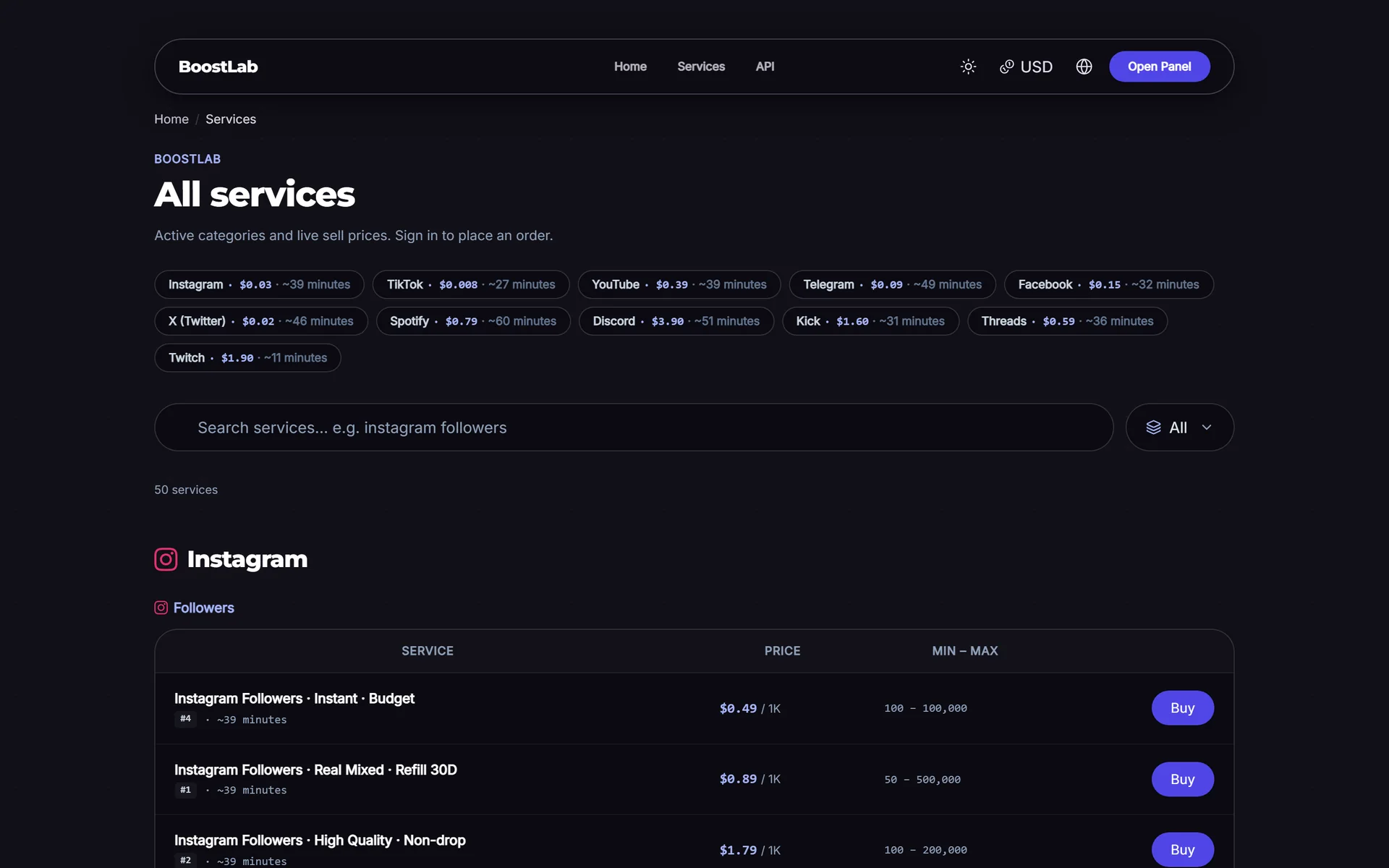
A provider's raw list is not a catalog. It often has hundreds or thousands of services, inconsistent names, internal codes, duplicates and services that stopped working months ago. Importing all of it and adding a markup is the most common beginner mistake. The job of a panel owner is to curate: choose fewer services, name them clearly, describe them honestly and price them by category.
Structuring categories
Group by platform first, then by result
Customers think in two steps: "Which platform?" and "What do I want there?". Mirror that in your category names:
- Instagram Followers
- Instagram Likes
- Instagram Views and Reels Plays
- TikTok Followers
- TikTok Views
- YouTube Views
- YouTube Subscribers
- Telegram Members
- Telegram Post Views
Put the platform name first so the list sorts naturally and the search box works. Avoid categories like "Best Services", "New", or a provider's brand name; they mean nothing to the buyer. On SMMFor, importing categories from a provider groups services by platform automatically and strips provider branding from category names, which gives you a clean starting point to edit.
How many categories and services
There is no correct number, but a useful rule for a new panel is depth over breadth. Three to six well-chosen services per category beat forty near-identical ones. A typical starting catalog might look like this (example only):
| Platform | Categories | Services per category |
|---|---|---|
| Followers, Likes, Views, Comments | 3–5 | |
| TikTok | Followers, Likes, Views | 3–4 |
| YouTube | Views, Likes, Subscribers | 2–4 |
| Telegram | Members, Post Views, Reactions | 3–4 |
Order categories by what sells. Put your highest-volume platform at the top and move rarely used platforms further down. Review the order once a month using your sales data.
Offer a clear quality ladder
Inside each category, give customers a visible choice between cheap and reliable. A simple three-step ladder works well:
- Economy: lowest price, no refill or short refill, slower or less stable.
- Standard: balanced price, refill period, steady speed.
- Premium: highest price, longest refill, best stability you can source.
The ladder lets price-sensitive buyers and quality-focused resellers both find a fit, and it makes your premium price look reasonable next to the cheaper option.
Naming services
A naming formula
Service names should be scannable and consistent across the whole panel. One formula that works:
Platform + Result + Quality + Key feature + Speed
Examples:
- Instagram Followers | Standard | 30-day refill | Up to 5K/day
- TikTok Views | Economy | No refill | Instant start
- Telegram Members | Premium | 60-day refill | Real-looking profiles
Use the same separators and the same words everywhere. If one service says "R30" and another says "30 Days Refill", customers have to think, and every moment of thinking is a chance to leave.
Words to avoid
Do not use claims you cannot guarantee: "100% real", "never drops", "safe forever", "guaranteed ranking". Providers change, platforms update their systems and drops happen. Overpromising in the name leads to refund requests and chargebacks later. Describe what the service is, not what you hope it will do.
Writing service descriptions customers trust
The description is where you answer questions before they become tickets. Use the same template for every service:
- Start time: for example "Usually starts within 0–2 hours" (based on your own tests).
- Speed: an approximate daily rate.
- Refill: the refill period and how to request a refill, or "No refill".
- Link format: exactly what to paste (profile link, post link, username).
- Requirements: account must be public, do not change the username during the order, do not order the same link twice at the same time.
- Cancel: whether cancel requests are supported.
- Notes: anything unusual, for example "Drops may occur; refill covers drops within 30 days".
Keep the tone factual. Customers trust a description that admits limits ("drops are possible") more than one that sounds like an advertisement. And if a service is linked to your own refill or cancel rules, make sure your terms and refund policy say the same thing.
Tip: write descriptions from your own test orders, not from the provider's text. Provider descriptions are written for their customers and may be outdated or exaggerated.
Minimum and maximum quantities
Providers set their own minimum and maximum per service. You can usually keep those or tighten them, but you cannot go outside them. A few practical rules:
- Do not set your minimum below the provider's. The order will fail at the provider.
- Raise the minimum on very cheap services so a single order is worth processing. An order worth a few cents still costs you support time if something goes wrong.
- Lower the maximum on unstable services. If a service tends to drop above a certain quantity, cap it and point big buyers to the premium option.
- Keep round numbers. Minimum 100, maximum 50,000 is easier to read than 117 and 48,350.
Check min/max values whenever a provider changes a service. A provider raising its minimum silently can make your existing settings invalid.
Service types and when to offer them
Not every service is "enter a link and a quantity". SMMFor supports 17 service types; the ones you will meet most often are:
| Type | What the customer enters | Good for |
|---|---|---|
| Default | Link and quantity | Followers, likes, views, members |
| Package | Link only (fixed amount) | Bundles, fixed-price offers |
| Custom comments | Link and a list of comments, one per line | Comment services where the buyer writes the text |
| Mentions | Link and usernames or hashtag | Mention-based services |
| Poll | Link and answer number | Poll votes |
| Subscriptions | Username, quantity range, number of posts, delay | Automatic likes or views on future posts |
| Drip-feed | Link, quantity, runs and interval | Spreading delivery over time |
The type must match what your provider expects. If the provider's service is "custom comments" and you list it as "default", orders will fail or deliver the wrong thing. When you add a provider service, check its type and copy it exactly.
Custom comments
Comment services generate more support than any other type because the buyer writes the text. Tell customers to enter one comment per line, explain that the quantity equals the number of lines, and list anything the provider does not accept (links, very long text, certain characters). Consider a higher minimum price for these orders.
Subscriptions and drip-feed
Subscriptions and drip-feed are powerful for regular customers but easy to misunderstand. Drip-feed splits one order into several runs over time; subscriptions watch an account and deliver on new posts. Explain the difference in plain words in the description. The SMMFor blog has a full explanation in drip-feed, refill and cancel explained, which you can link from your own FAQ.
Pricing with markup rules per category
Why a single global markup is not enough
A global markup (for example "add 50% to everything") is fine on day one. It breaks quickly, because categories behave differently:
- Very cheap, high-volume services (views, post views) can carry a high percentage markup because the absolute price is still tiny.
- Expensive services (subscribers, premium followers) need a lower percentage or customers compare and leave.
- Services with heavy support load (comments, refill-heavy followers) need extra margin to cover your time.
On SMMFor you can set a default markup in settings and override it per service. A sensible approach is a default for the panel, then deliberate exceptions for the categories that need them.
Worked example
The numbers below are examples, not recommendations. Prices are per 1,000.
| Category | Provider cost | Markup | Your price | Gross margin per 1K |
|---|---|---|---|---|
| TikTok Views | $0.02 | 300% | $0.08 | $0.06 |
| Instagram Likes | $0.40 | 100% | $0.80 | $0.40 |
| Instagram Followers Standard | $1.20 | 60% | $1.92 | $0.72 |
| YouTube Subscribers | $18.00 | 30% | $23.40 | $5.40 |
| Custom Comments | $6.00 | 80% | $10.80 | $4.80 |
Notice that the percentages differ, but every line still earns enough to justify the order. For deeper thinking about price positioning and margins, read SMM panel pricing and margins, and try the profit calculator with your own numbers.
Pricing mistakes to avoid
- Pricing below cost after a provider increase. Always recheck margins when provider prices change.
- Ignoring payment fees. If a gateway takes 3–4%, a 5% markup on a service leaves almost nothing. See the payments chapter.
- Odd prices that look random. $1.9237 per 1K looks like a mistake. Round to readable values.
- Racing to the bottom. The cheapest panel attracts the most price-sensitive buyers, who also leave first.
Syncing provider changes
Providers change prices, minimums, maximums and availability, sometimes daily. If your panel does not notice, you sell at a loss or accept orders that will fail. SMMFor syncs services, prices and statuses from providers connected through the standard SMM API v2 automatically, and order statuses are synced too. Automation removes most of the manual work, but you still decide how to react:
- Price goes up: does your markup still leave a healthy margin, or should you raise your price?
- Price goes down: keep the extra margin, or pass part of it on to stay competitive?
- Service disappears: switch to a backup service from the same or another provider, or hide the service.
- Min/max changes: update your own limits so customers do not see errors.
Keep a short list of backup services for your best sellers. When a provider's service goes down, you can point your service to an alternative quickly instead of losing a day of orders. Many panel owners connect at least two providers for exactly this reason.
Hiding, disabling and retiring services
You have three different tools, and they mean different things:
| Action | Customer sees it | New orders | Use when |
|---|---|---|---|
| Hide | Not in the public list | Depends on your panel settings | Testing, or keeping a service for specific resellers |
| Disable | No | No | Provider issue, temporary outage |
| Delete | No | No | Service is gone for good and has no open orders |
Prefer disabling over deleting. A disabled service keeps its history, its ID and its settings, so you can turn it back on when the provider recovers. Resellers who connect through your API use your service IDs in their own systems; deleting and re-creating services breaks their setups, which is a fast way to lose a reseller. More on that in the API and resellers chapter.
When you retire a service permanently, tell regular customers which service replaces it. A short announcement or a note in the old description for a week avoids a wave of tickets.
Testing services before you publish
Never publish a service you have not ordered yourself. A simple testing routine:
- Create a test account on the platform (or use your own account where allowed).
- Order a small quantity at or near the minimum.
- Note the start time, the speed and the final delivered count.
- Check again after a few days and after a week to see drops.
- If the service offers refill, request one and see what happens.
- Write the description from these results.
- Publish, then re-test the top sellers every month.
Log each test in a spreadsheet (service, date, start time, speed, 7-day drop, refill result). Within a few months it tells you which providers to trust.
Warning: buying engagement may conflict with the terms of service of social platforms. Test on accounts you control, describe services honestly and never promise customers that an account is safe from platform action.
Keeping the catalog clean
A monthly cleanup routine
- Remove or disable services with no orders in the last 60–90 days.
- Merge near-duplicate services into one clear option.
- Check that every service still matches its description (start time, speed, refill).
- Recheck margins after the month's provider price changes.
- Reorder categories by sales.
- Read support tickets for patterns: repeated questions mean a description needs work.
Common catalog mistakes
- Importing a provider's full list without curation.
- Leaving provider codes and brand names in service names.
- Empty or copied descriptions.
- One global markup for every category.
- Deleting services that resellers use by ID.
- Publishing services without a test order.
- Never revisiting the catalog after launch.
Catalog launch checklist
- At least one provider connected, ideally two
- Categories grouped by platform and result
- Three to six services per category with an economy, standard and premium ladder
- Consistent names using one formula
- Every description follows the same template
- Min/max checked against provider limits
- Service types match the provider's types
- Markup set per category, margins checked after payment fees
- Every published service tested with a real order
- Backup services noted for top sellers
If you want to try this on a live panel, you can open one on SMMFor with a 3-day free trial at smmfor.com/signup and build your first categories while you read.
Next step
With a clean catalog in place, the next question is how customers will pay you. Continue with the payments chapter, which covers choosing gateways by market, fees, deposit bonuses and fraud. If you are still setting up the basics, go back to setting up your panel step by step.
When you are ready, open your SMM panel on SMMFor: connect your providers, import categories and start shaping your catalog in minutes. Plans and the current offer are on the pricing page.