

SMM Panel SEO: Rank Your Panel Website in Google (2026)
Paid ads for SMM services are often restricted, so organic search is one of the few channels you can build for free. This chapter shows how to do SEO for an SMM panel step by step, with realistic timelines.
In this chapter:
- How people search for SMM services and how to turn that into a keyword map
- Which pages your panel website needs and how to structure them
- Writing titles, meta descriptions and headings that earn clicks
- A blog content plan that supports your money pages
- Multi-language SEO and hreflang for panels that sell in several countries
- Technical basics, link building you can actually do, and an honest timeline
Why SEO matters for an SMM panel
When you start an SMM panel, your first customers usually come from word of mouth, Telegram groups and reseller communities. Those channels work, but they stop growing when you stop pushing. Search traffic is different: a page that ranks for "buy Instagram followers cheap" or "TikTok views panel" brings visitors every day without extra spend.
There is a second reason. Many ad networks limit or refuse ads for bought engagement, so the paid route is narrow. Organic search, together with communities and referrals, is where most small panels find new buyers. You can read more about channels in the customer acquisition article; this chapter focuses only on search.
SEO is slow. A new domain typically needs several months before competitive pages move, and nobody can promise a ranking. Plan SEO as a long-term asset next to faster channels, not as a replacement for them.
Keyword research for SMM services
SMM keywords follow a clear pattern: platform + service + modifier. Once you see the pattern, keyword research becomes a spreadsheet exercise.
The keyword pattern
| Part | Examples |
|---|---|
| Platform | Instagram, TikTok, YouTube, Telegram, X (Twitter), Facebook, Spotify, Twitch |
| Service | followers, likes, views, comments, members, subscribers, watch time, plays |
| Modifier | cheap, panel, real, fast, wholesale, reseller, API, instant, with refill |
| Business terms | SMM panel, cheapest SMM panel, SMM reseller panel, SMM panel API, child panel |
Combine them and you get hundreds of phrases: "cheap Telegram members panel", "YouTube watch time SMM panel", "Instagram likes API". Each combination has a different intent.
Sort keywords by intent
- Buyer intent, service level – "buy TikTok views", "Instagram followers panel". These belong on service or category pages.
- Buyer intent, business level – "SMM panel", "cheapest SMM panel", "SMM reseller panel". These belong on your homepage.
- Reseller intent – "SMM panel API", "SMM panel for resellers", "child panel". These belong on your API page or a reseller landing page.
- Informational – "what is drip feed", "how does refill work", "why did my followers drop". These belong on blog posts and FAQ pages.
How to research without paid tools
- Type each platform + service into Google and note the autocomplete suggestions and the "People also ask" box.
- Look at the "Related searches" at the bottom of the results page.
- Use Google Search Console once your site is live: the Queries report shows real phrases that already bring impressions.
- Check your own support tickets and Telegram chats. The words your customers use are often better keywords than anything a tool suggests.
- Write everything into a sheet with columns: keyword, intent, target page, priority.
Priority rule of thumb: start with long, specific phrases ("Telegram post views panel") rather than broad ones ("SMM panel"). Broad terms are crowded with old, strong sites; specific phrases are winnable for a new panel.
Site structure for an SMM panel
A clear structure helps both visitors and search engines. A typical panel website that is built for SEO looks like this:
| Page | Target keywords | Purpose |
|---|---|---|
| Homepage | SMM panel, cheap SMM panel, your brand | Explain what you sell, show top services, sign-up |
| Platform category pages | Instagram SMM panel, TikTok panel | One page per platform, links to service pages |
| Service pages | buy Instagram likes, YouTube views panel | One page per main service type with details |
| Services list / price list | SMM panel price list | Full catalog with live prices |
| API page | SMM panel API, reseller panel | Documentation for resellers |
| Blog | Informational questions | Answers, guides, updates |
| FAQ, terms, refund policy | Trust and support questions | Reduce tickets, build trust |
Do not create a separate page for every one of your 2,000 catalog entries. A page per platform and per main service type is enough. Thin pages that differ only by a number confuse search engines and look like spam.
The structure of your catalog itself is covered in the services and catalog chapter, and page design in the website design chapter.
What a good service page contains
- An H2 that matches the search: "Instagram Likes – Fast, Cheap, With Refill Options".
- A short intro in plain words: what the service is, who uses it, delivery speed range.
- A table of the available variants (quality tiers, start time, speed, refill period, price per 1,000).
- An explanation of refill and cancel rules for that service type.
- A short "how to order" list: paste link, choose quantity, pay from balance.
- An FAQ section with 4–6 real questions from your tickets.
- Clear links to the order page and related services.
Write honest descriptions. Do not promise "real active users" if the service is not, and do not imply that bought engagement guarantees reach or sales. Honest pages also mean fewer refund disputes later.
Titles, meta descriptions and headings
The title tag is still the strongest on-page signal you control, and the meta description is your ad text in the results.
Title tag rules
- Put the main keyword first: "Instagram Followers Panel – Cheap & Fast | YourBrand".
- Keep it around 50–60 characters so it does not get cut off.
- Every page gets a unique title. Duplicate titles across 20 service pages are a common mistake.
- Include the brand at the end, not the start (except on the homepage).
Meta description rules
- 140–160 characters, written for humans.
- Mention what makes the page useful: price range, refill, payment methods, support hours.
- End with a soft call to action: "See prices and order in seconds."
- Avoid claims you cannot prove, such as "#1 panel" or "100% safe".
Heading structure
Use one H1 per page (usually the page name), then H2s for main sections and H3s for details. Headings should read like a table of contents. If someone scanned only your headings, they should understand the page.
Many panel builders, including the SMMFor page editor, let you set a title and SEO description per page and per blog post. Fill them in for every page; empty fields fall back to generic text that rarely ranks.
A blog content plan that supports sales
A blog for an SMM panel has two jobs: answer questions that buyers search before ordering, and pass internal links to your service pages.
Content types that work
| Type | Example topic | Links to |
|---|---|---|
| Explainer | What does "drip-feed" mean and when to use it | Order page, services with drip-feed |
| Problem solving | Why did my order go partial and what happens next | Refund policy, support page |
| Platform guide | How to share a public Instagram post link for an order | Instagram category page |
| Comparison | Views vs. watch time: what each service actually does | YouTube category page |
| Reseller content | How to connect your panel to ours via API | API page |
| Updates | New services added this month | Updated service pages |
Do not copy text from provider descriptions or other panels. Copied content rarely ranks and adds nothing. Write from your own experience: real delivery times you observe, real questions you get.
A simple publishing rhythm
Example plan for the first three months (adjust to your time):
- Month 1: 4 posts answering the most common support questions.
- Month 2: 4 platform guides, one for each of your top platforms.
- Month 3: 2 comparison posts, 2 reseller posts.
- Every month: update one older post with new information instead of only writing new ones.
Each post should link to at least one service or category page using descriptive anchor text such as "TikTok views services", not "click here".
Multi-language SEO and hreflang
Many panels sell in several markets at once: English for global resellers, plus Turkish, Arabic, Russian, Spanish, Portuguese or Hindi for local buyers. Done right, each language can rank on its own.
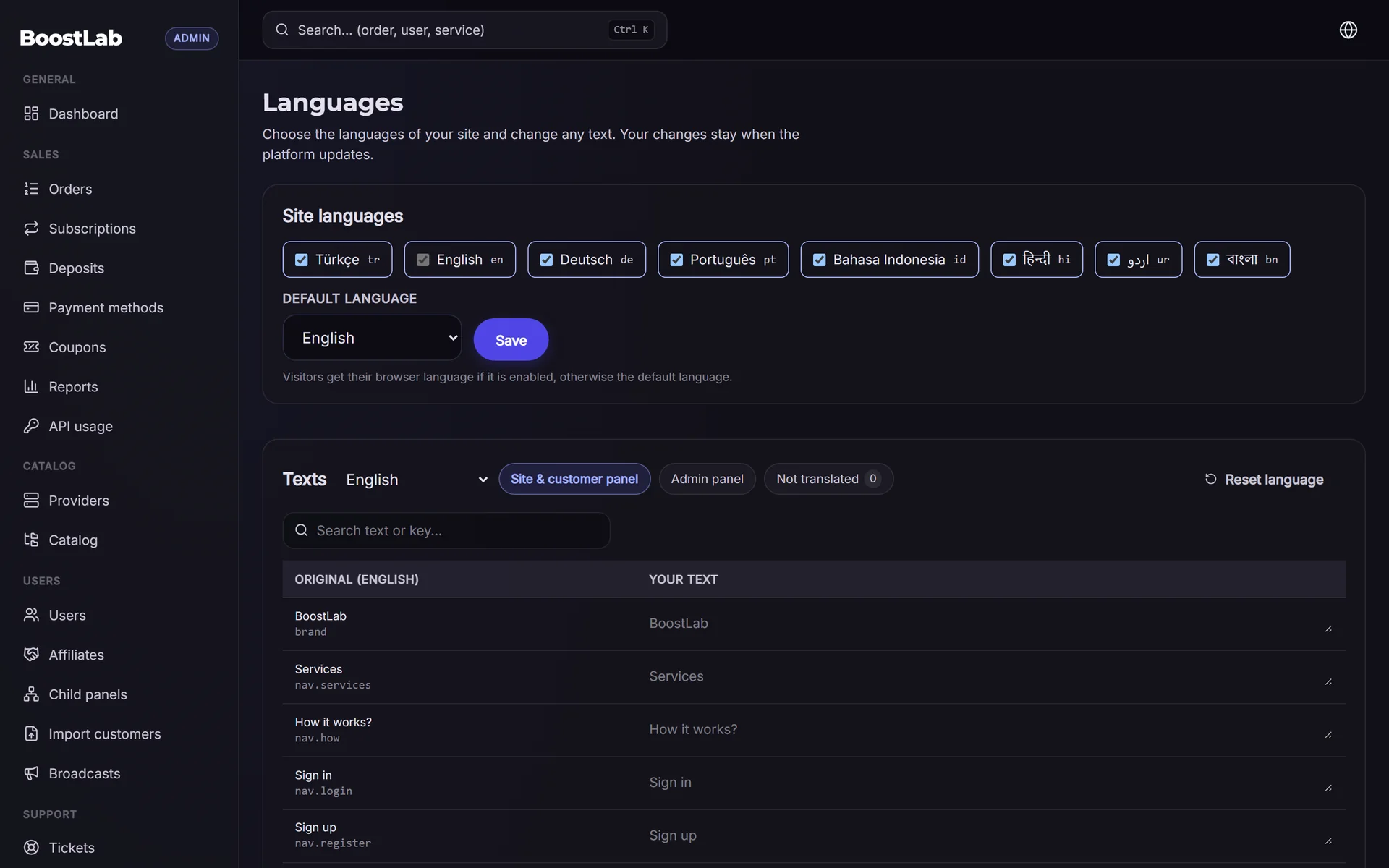
- Give each language its own URL (for example
/tr/...or/ar/...). Do not switch language only with a cookie or script, because search engines need a crawlable address for each version. - Use hreflang tags so search engines know which pages are translations of each other. Every version should reference all others and itself, and include an
x-default. - Translate properly. Machine translation is a good start for a first draft, but have a native speaker review service names and key pages. Buyers notice awkward wording and trust drops.
- Localise, not only translate: show local payment methods, local currency and local examples on each language version.
- Keep URLs, titles and meta descriptions in the target language too.
SMMFor storefronts support multiple languages and multi-currency display; see multi-currency for how prices can be shown in local money.
Technical SEO basics
You do not need to be a developer, but you should check these points once after launch and again every few months.
Technical checklist
- HTTPS everywhere. Every page should load over SSL with no mixed-content warnings.
- One main domain. Pick either
wwwor the bare domain and redirect the other. - Sitemap. An XML sitemap listing your public pages, submitted in Google Search Console and Bing Webmaster Tools.
- Robots.txt. Public pages crawlable; admin, customer dashboard and checkout areas not.
- Mobile. Most buyers order from a phone. Test every key page on a small screen.
- Speed. Compress images, avoid heavy sliders and many third-party scripts. Each chat widget and tracking script adds weight.
- Indexing control. Customer pages, order pages and login pages should not appear in search results.
- Redirects after moving. If you move from another panel script or domain, 301-redirect old URLs to the closest new page. Otherwise you lose the rankings you built.
- Structured data. FAQ and organization markup can help search engines understand your pages, but it does not guarantee rich results.
Moving domains or panel software is the moment when most panels lose their search traffic. Before switching, export a list of your old URLs and map each to a new one. SMMFor's migration help and redirect settings are built for this step.
Custom domain versus subdomain
A free subdomain is fine for testing. For SEO, a custom domain you own is better: links you earn stay with your brand forever, even if you change hosting later. Choosing the name is covered in the name and domain chapter.
Link building you can actually do
Links from other sites still matter, but the SMM niche is full of spammy link schemes. Bought link packages and private blog networks can lead to penalties, so focus on links that make sense.
Realistic link sources
- Directories and listings of SMM panels that review or list services (check that they are real sites with traffic, not link farms).
- Your own social profiles: Telegram channel, Instagram, YouTube, X. Link your site in each bio.
- Guest content on marketing, freelancing or creator blogs, written to help, not to advertise.
- Free tools and resources: a simple engagement-rate calculator or a guide that others want to reference.
- Partners and resellers: resellers who build on your API often mention their provider.
- Forums and communities: answer questions honestly; the occasional link to a helpful guide is fine, link-dropping is not.
Internal links
Internal linking is the link building you fully control. Every blog post should link to a relevant service page, every service page to its category page, and every category page back to the homepage and the full services list. A visitor should never hit a dead end.
Measuring SEO and an honest timeline
Track a few numbers monthly rather than many numbers daily.
| Metric | Where | What it tells you |
|---|---|---|
| Impressions and clicks | Search Console | Whether pages are being seen and chosen |
| Average position per page | Search Console | Which pages are close to the first page |
| Organic sign-ups | Your panel stats with UTM or referrer | Whether search traffic becomes customers |
| Indexed pages | Search Console | Whether important pages are being indexed |
A realistic picture for a new panel website (an example, not a promise): in the first one to three months, impressions start for long, specific phrases; between three and six months, some service pages may reach page one for low-competition terms; broad phrases like "SMM panel" can take a year or more, and may never move if competition is strong. Results depend on your content, links, niche and market.
Common SEO mistakes on SMM panels
- Copying service descriptions from the provider panel word for word.
- Hundreds of near-identical pages, one per catalog item.
- The same title on every page ("YourBrand – Best SMM Panel").
- Hiding all content behind the login page so search engines see nothing.
- Buying cheap backlink packages.
- Promising results ("guaranteed viral", "100% safe") that both search engines and customers distrust.
- Changing domains without redirects.
- Starting a blog, posting three times, then abandoning it.
SEO checklist for launch week
- Connect Google Search Console and Bing Webmaster Tools, submit the sitemap.
- Write unique titles and meta descriptions for the homepage, category pages and service pages.
- Create one category page per main platform with an honest service table.
- Publish your terms, refund policy and privacy policy (see the next chapter).
- Add an FAQ page from your first support questions.
- Set up language versions with their own URLs if you sell in more than one market.
- Link your site from every social profile you own.
- Plan your first four blog posts.
Next step
Search traffic brings visitors to pages that make promises, so the next job is to make those promises clear and fair in writing. Continue with the legal and policies chapter, which covers terms of service, refund rules and privacy.
When you are ready to build your panel website, you can open a panel on SMMFor with a 3-day free trial and start with a free subdomain or your own domain. Compare plans on the pricing page.