

SMM Panel Payment Methods: Gateways, Fees and Fraud
Customers can only order once they can top up their balance. This chapter explains how to pick payment methods for your market, set fees and limits, use bonuses wisely and keep fraud under control.
In this chapter
- How SMM panel payments work: balance first, orders second
- Choosing payment methods by market, with a decision table
- Cards, PayPal, local gateways, crypto and manual bank transfer compared
- Setting fees, minimum deposits and deposit bonuses per method
- Fraud, chargebacks and who should be allowed to use which method
- Daily reconciliation and multi-currency basics
How payments work in an SMM panel
Almost every SMM panel runs on a prepaid balance. A customer adds funds, the money lands in your payment account, their panel balance goes up, and each order is deducted from that balance. You never charge a card per order.
This model has three consequences you should design around:
- Your payment page is your checkout. Every friction on the Add Funds page costs you orders.
- Deposits and orders are separate events. A customer can deposit today and order next week, so your books must track balances, not just sales.
- Refunds usually go to the balance, not the card. When an order fails or is partially delivered, you refund to the panel balance. Your terms and refund policy should say this clearly.
On SMMFor, payment methods connect to your own gateway accounts, so money goes directly to you rather than through the platform. The panel credits the balance automatically when the gateway confirms the payment.
Choosing payment methods by market
The right mix depends on where your customers live and how they prefer to pay. Start with the question "How does my typical buyer pay for small digital purchases?" and work backwards.
| Market | Usually expected | Often useful | Notes |
|---|---|---|---|
| Global / mixed | Cards, crypto | PayPal, e-wallets | Resellers often prefer crypto for speed |
| Turkey | Local card gateways | Papara, bank transfer, crypto | Turkish-language checkout with familiar bank logos builds trust |
| South Asia | Local wallets, crypto | Bank transfer | Low ticket sizes, many small deposits |
| Latin America | Cards, local methods | Crypto | Currency volatility makes stablecoins popular |
| Europe / US | Cards, PayPal | Crypto | Card checkout with a recognisable brand builds trust |
This is a starting point, not a rule. Watch which methods your customers actually use in the first month and adjust.
How many methods to offer
Two to four methods is a good start. One method is a single point of failure: if the gateway freezes your account, your panel stops earning overnight. Ten methods confuse customers and multiply your reconciliation work. A practical starting set is one card option, one crypto option and one local or manual option for your main market.
The main payment method types
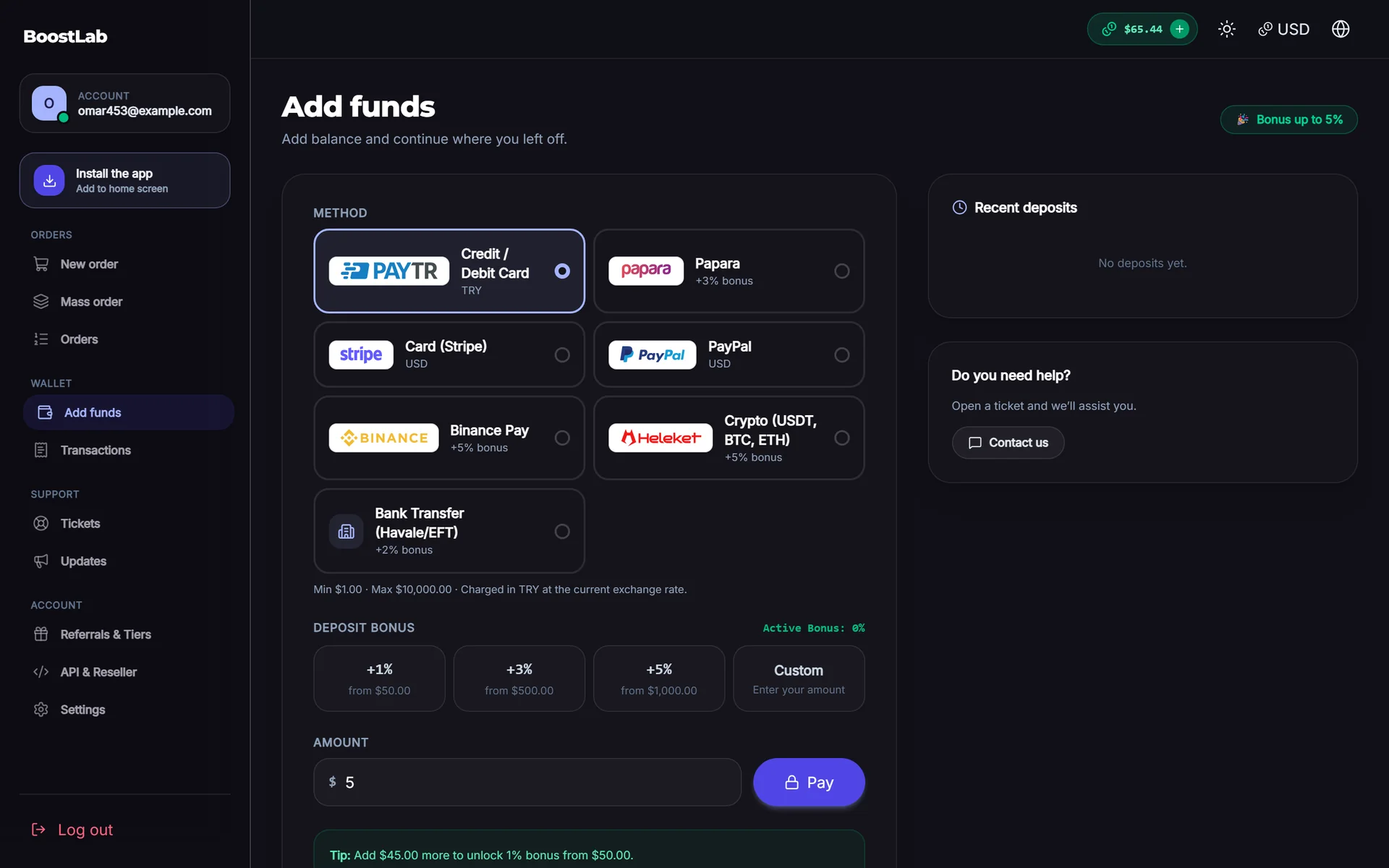
Card payments
Cards are what most first-time buyers try first. Gateways like Stripe and Paddle handle global card payments, while PayTR and iyzico focus on the Turkish market.
- Pros: familiar, fast, high conversion for new customers.
- Cons: chargebacks, stricter merchant rules, and some card processors may not accept social media marketing services. Read each provider's acceptable use policy before you apply and describe your business honestly.
PayPal
PayPal is trusted by many buyers, especially in Europe and North America. It has buyer protection, which means disputes are common and often decided in the buyer's favour for digital goods. If you offer PayPal, keep detailed order logs so you can respond to disputes with evidence.
Local gateways
In many countries a local gateway converts far better than a global one, because it shows familiar bank logos, local language and local currency. For Turkey, SMMFor supports PayTR, iyzico, Shopier, Papara and Paywant. Local gateways usually require a registered business and some paperwork, so plan for that in your business plan.
Crypto payments
Crypto is popular with resellers and international buyers because it is fast, works across borders and has no chargebacks. SMMFor includes Binance Pay, Heleket, Cryptomus, NOWPayments, Plisio and CoinPayments, among others. Crypto payments are converted to your panel's currency when the balance is credited. See crypto payments on SMMFor for the details.
Things to keep in mind:
- Offer stablecoins (such as USDT) so customers do not worry about price swings.
- Network fees vary; tell customers which network is cheapest.
- Underpayments happen. Decide in advance how you handle a customer who sent slightly less than requested.
Manual and bank transfer
Manual methods (bank transfer, local wallets you check by hand) cost nothing in gateway fees and are familiar in some markets, but they cost you time. The customer pays, sends a reference, and you or your staff confirm and add the balance.
If you offer manual payments:
- Ask for a clear reference (the customer's username in the transfer description).
- Set a minimum high enough to justify the manual work.
- Publish your confirmation hours, for example "Confirmed within 1 hour between 09:00 and 23:00".
- Never credit a balance before the money is actually in your account.
The full list of built-in gateways is on the payment gateways page.
Fees, minimum deposits and limits
Passing fees to customers
Every gateway charges something: a percentage, a fixed amount or both. You have two options:
- Absorb the fee and build it into your service markup. Simpler for customers.
- Add a fee per method so customers who choose an expensive method pay for it.
On SMMFor each payment method can have its own percentage fee, fixed fee, minimum and maximum amount and extra bonus percentage. A common approach is to absorb fees on your cheapest method and add a small fee on the expensive ones, which gently steers customers toward the method that costs you least.
Example fee table
The figures below are illustrative only. Check your own gateway contracts.
| Method | Gateway cost (example) | Fee you add | Minimum deposit |
|---|---|---|---|
| Crypto (stablecoin) | ~1% | 0% | $5 |
| Global cards | ~3% + fixed | 3% | $5 |
| PayPal | ~4% + fixed | 4% | $10 |
| Local card gateway | ~2–3% | 0–2% | $3 equivalent |
| Bank transfer | 0% | 0% | $20 |
Setting minimum deposits
A minimum deposit protects you from fixed fees eating the payment and from card testers (fraudsters who make tiny payments to check stolen cards). It also gets in the way of first-time buyers who just want to try. A balance:
- Keep a low minimum on your safest method (often crypto or a local gateway) so newcomers can test.
- Use a higher minimum on methods with chargeback risk or manual work.
- Set a maximum on card methods for new customers to limit the damage from a stolen card.
Deposit bonuses
A deposit bonus adds extra balance to larger top-ups, for example "+5% on deposits over $100". Used well, it increases average deposit size and keeps money in your panel.
Guidelines:
- Tie bonuses to amount, not frequency. "+5% over $100" is safer than "+10% on every deposit".
- Give bonuses on low-fee methods. A 5% bonus on a method that already costs you 4% leaves you with nothing.
- Make bonus balance non-withdrawable in your terms. Customers spend it on orders.
- Budget for it. A bonus is a discount; include it in your margin calculations.
SMMFor supports a bonus percentage per payment method, plus coupons for one-off promotions. More growth ideas are in the growth chapter.
Tip: launch with no bonus or a small one. It is easy to add a bonus later and awkward to take one away from customers who are used to it.
Fraud and chargebacks
How fraud shows up in SMM panels
- Stolen cards: a new account deposits with a stolen card, spends the balance immediately, and the real cardholder files a chargeback weeks later.
- Card testing: many tiny deposits from one account or IP range.
- Friendly fraud: a real customer gets the service and then disputes the payment.
- Refund abuse: a customer orders, asks for cancel or refund, and tries to withdraw the balance.
A chargeback usually costs you the payment, the gateway's dispute fee, and the provider cost of the orders already delivered. Too many chargebacks can get your merchant account closed.
Controls that help
- Restrict risky methods to trusted customers. On SMMFor every method can be limited to everyone, verified-email customers only, or customers who have already made a payment. A common setup: crypto and local methods for everyone, card methods only after email verification or a first deposit.
- Cap first deposits on card methods.
- Never allow balance withdrawals to a different method than the original payment. Most panels do not allow withdrawals at all.
- Keep evidence. Order logs, delivery status, the customer's IP and the terms they accepted at signup are what you need to win a dispute.
- Watch for patterns. Many accounts from one IP, many failed payments, or a brand new account placing a very large order are signals.
- Turn on 2FA for your own admin account. Payment credentials are the most valuable thing in your panel. See the security chapter.
Warning: never add balance manually because a customer sends a screenshot of a payment. Screenshots are easy to fake. Credit only when the money appears in your gateway or bank account.
Reconciliation
Reconciliation means checking that what your panel says happened matches what your gateways and bank say happened. It sounds boring; it is how you catch problems early.
A simple daily routine (10 minutes):
- Compare yesterday's deposits in the panel with each gateway's dashboard.
- Look for payments that are paid in the gateway but not credited in the panel, or the other way round.
- Check manual payments: every credited amount should have a matching bank entry.
- Note any disputes or chargebacks and lock the related accounts if needed.
A weekly routine adds a check of total customer balances (money you owe in services) against cash on hand. Your providers also need prepaid balances, so make sure your provider top-ups keep pace with customer deposits. If you use webhooks or automation rules, you can send payment notifications to a Telegram chat to spot problems faster.
Multi-currency
Base currency versus display currency
Your panel has one base currency: the currency balances, prices and reports are stored in. SMMFor lets you choose from 60 currencies, such as USD, EUR or TRY. Customers can then view prices in their own currency using current exchange rates, while they are still charged in your base currency.
Choose the base currency carefully:
- If most customers are in one country and pay in its currency, use that currency.
- If your customers are international or your providers bill in USD, USD is usually simplest.
- On SMMFor, the base currency can be changed until the first money record (payment, order or balance change); after that it is locked to keep your accounting consistent.
Currency risk
If you sell in a local currency and buy from providers in USD, exchange rate moves change your margin. When the local currency weakens, your provider costs rise in local terms. Review prices more often in volatile currencies, and keep a buffer in your markup. More on currency display in multi-currency on SMMFor.
Payment setup checklist
- Two to four methods chosen for your main market
- At least one method with no chargeback risk (crypto or bank transfer)
- Fee, minimum and maximum set per method
- Card methods restricted for brand-new customers
- Bonus rules written into your terms, if you use bonuses
- Refund policy states refunds go to balance
- Daily reconciliation routine in your calendar
- 2FA on every admin and staff account
- Base currency chosen deliberately
Want to see the payment settings for yourself? A 3-day free trial on SMMFor lets you explore every method and its settings before you go live.
Next step
Payments are ready; now make the panel look trustworthy enough that people actually use them. Continue with the website design chapter, which covers designs, homepage sections, trust elements and the customer dashboard. If your service list is not finished, return to the services and catalog chapter.
When you are ready to go live, open your panel on SMMFor and compare plans on the pricing page.